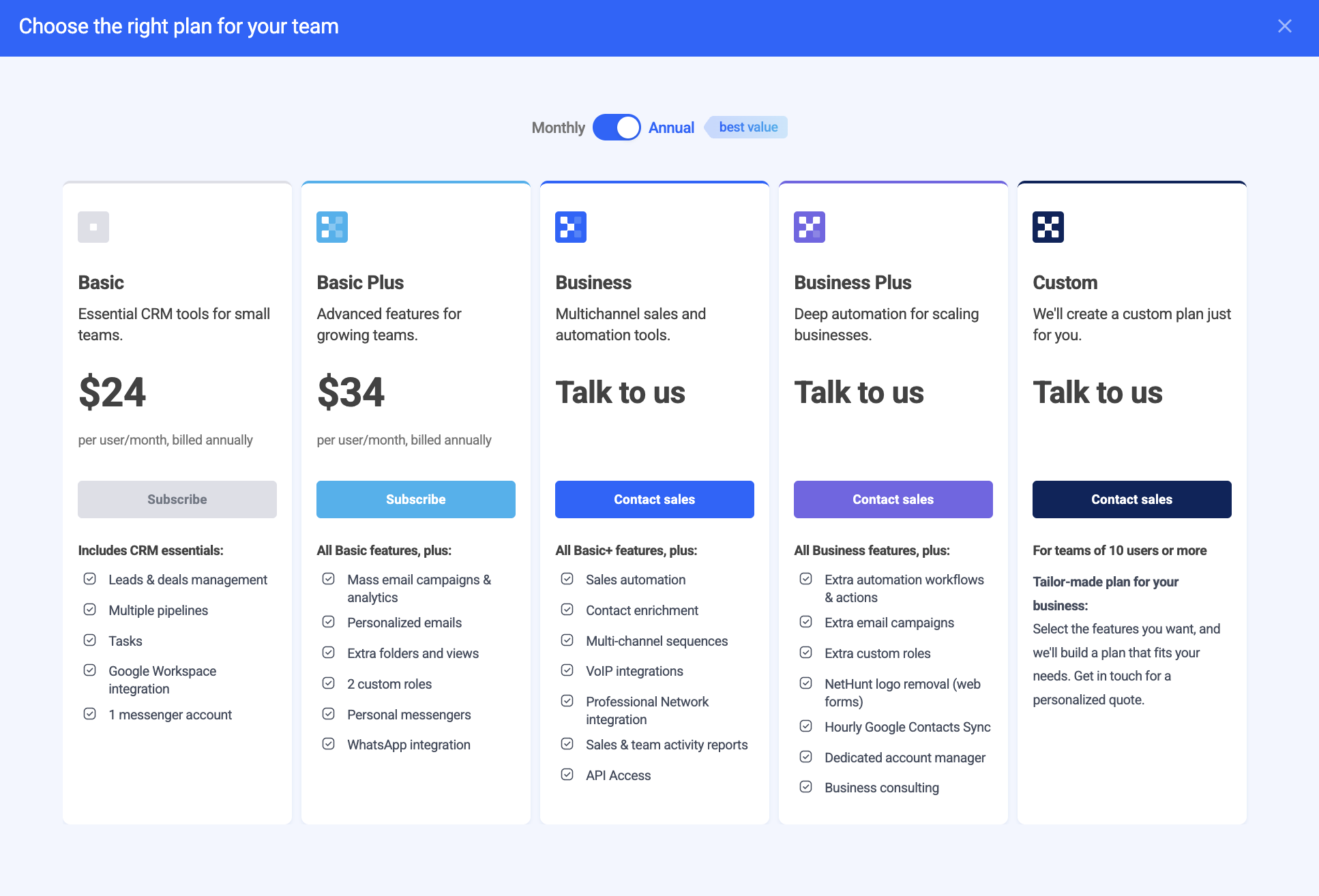
NetHunt offers 5 subscription plans: Basic, Basic Plus, Business, Business Plus and Advanced.
When you start testing the system, you get a 14-day free trial. It means that for 14 days you can test the system with no feature limitations, adding as many users as you want. Additionally, you receive our full customer support.
How NetHunt pricing works
After the trial, you can choose among 5 subscription plans to sign up for.
When you choose a Basic, Basic Plus, Business or Business Plus you will be charged for each user in your workspace.
Additionally, NeHunt provides a Custom plan that can be designed specifically for each individual user. To get started, simply request a call with our manager.
Imagine: you have 5 users and want to subscribe for the Basic plan. You have two options: subscribe monthly or annually.
Monthly subscription
If you take a monthly subscription, you will be charged $30 per user which is $150/month/5 users (5*$30 = $150).
If you decide to add a new user during the period of use, you will be charged the difference within the next payment (on your next billing date). Basically, your invoice will cover the fee for the upcoming month for 6 users and the fee for the time this new user was already using the system prior to the billing date. We are prorating the amount that should be paid according to the time he spent in the CRM.
Annual subscription
If you go with the annual subscription, you get a 20% discount, resulting in $24/user/month. This will account to 5*24 = $120, saving you $30 a month and $360 a year.
Let's say you signed up for a year with 5 users and paid $1440. After 6 months, you add the 6th user (they will use the system for 6 months before the next billing date). This way you will be charged for all the 6 users when the billing date comes, yet you will only pay the difference for the 6th one (for 9 months).
In this case we will charge the difference for this 6th user and the upcoming 6 months he will be using the system on the 1st of next month, thus, we are now waiting for the next actual billing date as in the monthly subscription.
On the other hand, if you remove one of the 5 users during the subscription period (a year), the not-used money for their account will go to your credit balance. For instance, if they used the system for 3 months, you will get the rest, which is 9 months, credited to your account. You may use these funds for further payments.
How to pay for a subscription
When you decide to sign up for 1 of our 5 plans (Basic, Basic Plus, Business, Business Plus or Advanced), you need to:
There are two ways how to start with the payment process in NetHunt:
1. From your dashboard:

2. From your Billing tab in the Settings:

Both ways lead you to our Pricing Page where you can choose among the plans to upgrade. You can check all the features included in each plan, cost and select either a monthly subscription or annual.
Having chosen your plan - input your credit card information:

Your card would be instantly verified and you can purchase your plan.
If needed, you can always change your credit card information.
Before the purchase, double check everything and pay attention to:
-
Your plan type;
-
Discount coupon (if any);
-
Total amount.

Click on a "Place Order" button and wait for the confirmation from our side.
Haven’t found the answers you’re looking for? Ask our Users Community.
